|
1. |
เรียก
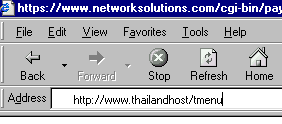
โปรแกรม Mail Manager โดยพิมพ์
www.yourdomain.com/tmenu ในช่อง "Address" ของ
browser โดย yourdomain.com หมายถึงชื่อโดเมนที่ได้จดทะเบียนไว |
| |
|
| |
 |
| |
รูปแสดง
การเรียก โปรแกรม Mail Manager
จาก Browser |
| |
|
|
2. |
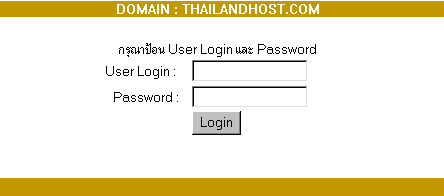
หลังจากนั้นโปรแกรมจะปรากฏหน้าเวบเพจให้กรอก
login และ password ดังรูปข้างล่าง
ให้ใช้ login (user) และ password
ที่ใช้สำหรับ FTP upload เวบเพจ
ที่ทางบริษัทส่งไปให้กรอกลงในช่องดังกล่าว |
| |
|
| |
 |
| |
รูปแสดงการป้อน
user และ password |
| |
|
| |
เมื่อกดไอคอน
Mail Manager
จะให้ป้อน user
และ password
สำหรับเข้าไปจัดการเรื่อง E-Mail
อีกครั้งดังรูปข้างล่าง |
| |
|
| |
 |
| |
|
|
3. |
เมื่อป้อน
user และ password ถูกต้องแล้ว
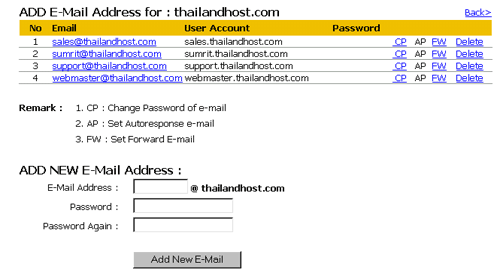
จะปรากฏหน้า เวบเพจดังรูปข้างล่าง |
| |
|
| |
|
| |
รูปแสดง
Mail Manager |
| |
|
|
4. |
ให้ป้อนชื่อ
account e-mail
ลงในช่อง E-Mail Address
เช่น sales
สำหรับ
e-mail address
sales@thailandhost.com
และป้อน passwrd
ให้เหมือนกันในช่องที่เหลืออีก
2 ช่อง เรียบร้อยแล้ว ให้คลิ๊กที่ปุ่ม
"Add New E-Mail" |
| |
|
|
5. |
รอสักครู่หนึ่ง
โปรแกรมจะสร้าง e-mail
addres ตามที่ต้องการให้
และแสดงรายละเอียดให้เห็น ดังรูปข้างบน |
| |
|
| |
หัวข้อที่เกี่ยวข้อง |
| |
เปลี่ยน
password e-mail ลบ
account e-mail การ
setup e-mail ใช้งาน |